PHP2Shell (CVE-2026-109618 & CVE-2026-109619): What Actually Protects You, What Doesn't, and Mitigating at the Edge with Google Cloud Armor 🛡️

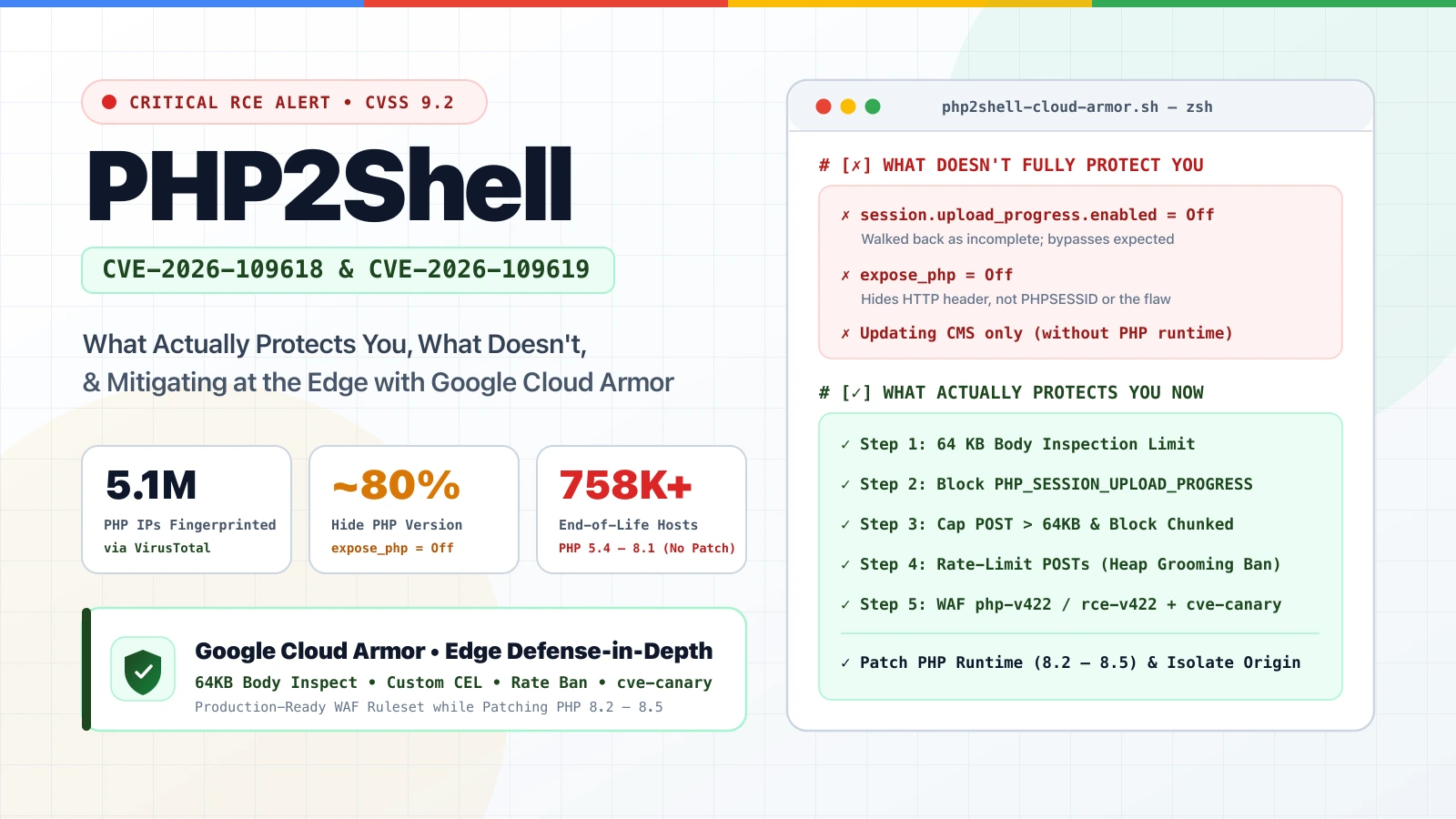
When two critical Remote Code Execution (RCE) vulnerabilities in PHP—dubbed “PHP2Shell” (CVE-2026-109618 and CVE-2026-109619, rated CVSS v4.0 9.2)—leak hours before an emergency out-of-band security release, the internet immediately floods with quick-fix one-liners. The problem? The php.ini setting everyone is copy-pasting on social media is not a complete fix. Let’s look at the real exposure window using VirusTotal Internet Scanning, separate what actually protects you from what doesn’t, and walk through a verified, production-ready Google Cloud Armor configuration to shield your workloads at the edge.
Back to the Trenches: Why PHP2Shell Has SecOps Teams on High Alert
If you read my recent post on AI Era Vulnerability Trends with Google Threat Intelligence and Wiz, you know how fast the window between disclosure and active exploitation has shrunk in 2026. When technical details leak early, that window drops from days to hours.
On October 20, 2026, the PHP security team announced an out-of-band security release for Wednesday, October 21, 2026 at 14:00 UTC to fix two critical vulnerabilities rated CVSS v4.0 9.2: CVE-2026-109618 and CVE-2026-109619.
Hours before the release, technical details leaked publicly pointing to Remote Code Execution (RCE) vectors involving multipart/form-data parsing, heap grooming via oversized POST requests, and the session.upload_progress feature—built into PHP since 5.4.0 and enabled by default. Within 15 minutes of the write-up URL circulating, archives and crowdsourced reports were already hitting VirusTotal.
Whenever a core runtime bug like PHP2Shell drops, security engineers and CISOs ask me three questions:
- What is the real risk and impact across our internet-facing footprint?
- What actually works right now—and which workarounds give a false sense of security?
- How can we deploy a Google Cloud Armor ruleset today to mitigate the attack mechanics at the edge while our teams patch?
Sizing the Exposure Window: What VirusTotal Sees Across 5.1M PHP Hosts
To understand the impact of CVE-2026-109618 and CVE-2026-109619, my colleague Joseliyo Sánchez published Sizing the PHP exposure window for CVE-2026-109618 and CVE-2026-109619 with VirusTotal using Internet Scanning in VirusTotal (part of Google Threat Intelligence).
The numbers are a wake-up call if you rely on simple version-banner scans to find your PHP servers:
- 5.1 Million PHP IPs (3.8M Open Today): VirusTotal fingerprints roughly 5.1 million IP addresses running PHP (
port_service_cpe:php), with 3.8 million having at least one open port today. - 4 Out of 5 PHP Servers Hide Their Version: Only ~1.1 million hosts announce their version in an HTTP header like
X-Powered-By: PHP/8.3.35. Roughly 80% hide their version viaexpose_php = Off, stripped headers, or reverse proxies. VirusTotal still identifies them as PHP viaPHPSESSIDcookies, framework headers, and the applications on top (WordPress at ~538K IPs, Laravel at ~141K, Nextcloud at ~107K, plus Roundcube and phpMyAdmin at ~25K). - The End-of-Life (EOL) Long Tail: Only four PHP branches receive official security fixes: 8.2, 8.3, 8.4, and 8.5 (fixed in 8.2.35, 8.3.36, 8.4.27, and 8.5.12). Among hosts disclosing a version, only ~272K run a supported branch. Roughly 758K hosts run an End-of-Life branch between PHP 5.4 and 8.1 (~187K on PHP 7.4 and ~119K on PHP 5.4), which have
session.upload_progressenabled by default and receive no upstream patches. - Even Up-to-Date Hosts Were Exposed: About 85K IPs ran the exact latest releases from September 24 (
8.3.35,8.2.34,8.4.26,8.5.11) right up until the October 21 patch. - Co-Exposed Ports Pinpoint Target Profiles: Around 394K PHP hosts also expose port
22(SSH), 233K expose3306(MySQL), and 68K expose3389(RDP). Because the leak referenced LiteSpeedlsphp82(8.2.34) builds on Debian 12, Ubuntu 22.04, and Ubuntu 24.04, defenders can combine HTTP banners with port 22 OpenSSH banners in VirusTotal (entity:ip port_service_cpe:php port_banner:"PHP/8.2.34" port_service_version[22]:"9.6p1 Ubuntu") to find and patch the exact target profile first.
❌ What Doesn’t Protect You (Don’t Fall for These Traps)
As highlighted in The Hacker News’ breakdown of what actually protects you, several viral workarounds will not save an unpatched server:
- Relying Only on
session.upload_progress.enabled = Off: GMO Flatt Security initially suggested disabling Session Upload Progress inphp.ini, but walked it back hours later warning that the setting alone is not a complete fix and bypasses are expected. PHP core developer Gina Peter Banyard noted: “The only mitigation is patching / upgrading PHP,” and PHP 8.6 release manager Joe Ferguson put it bluntly: “ini settings won’t save you.” Keep it off if you don’t use upload progress bars, but remember:.user.inionly applies to CGI/FastCGI (and takes up to 300s to reload), andphp -iin the shell only shows CLI settings—not your running PHP-FPM,mod_php, or LSAPI workers! - Thinking
expose_php = OffHides You: Settingexpose_php = Offhides theX-Powered-Byheader, notPHPSESSIDcookies or the underlying vulnerability. - Updating Your CMS Without Updating the PHP Runtime: Updating WordPress, Laravel, or Drupal does not update
php-fpmor your container base image. (Tip: Debian and Ubuntu backport CVE fixes into existing version numbers—check your distro’s package changelog rather than relying on the version string alone.) - Deploying a WAF While Leaving Origin IPs Exposed: Edge rules only work if attackers cannot bypass your load balancer and hit your origin VM or GKE node directly.
✅ What Works Now: Patching, Isolation & Google Cloud Armor
While upgrading the PHP runtime is the only permanent fix, patching production fleets and migrating EOL branches (PHP 5.4–8.1) takes time. Deploying a Google Cloud Armor ruleset in front of your Application Load Balancers is one of the fastest ways to mitigate a major part of the risk at the edge right now.
Monitor the Cloud Armor Release Notes (cve-canary)
Bookmark and watch the official Google Cloud Armor Release Notes. Once Google Cloud Armor’s dedicated signature for PHP2Shell (CVE-2026-109618 / CVE-2026-109619) lands in the release notes, it will be launched as part of the cve-canary ruleset (evaluatePreconfiguredWaf('cve-canary')), giving you immediate virtual patching alongside our custom rules below.
🛡️ Verified, Production-Ready Policy Configurations
Here is the fully validated, syntactically correct configuration block ready for production deployment.
Step 1: Increase Request Body Inspection Size to the 64 KB Maximum
This must be done first to ensure the WAF actually evaluates POST payloads up to the maximum physical buffer limit.
gcloud compute security-policies update POLICY_NAME \
    --request-body-inspection-size=64kB
Step 2: Custom CEL Rule 1 — Block PHP_SESSION_UPLOAD_PROGRESS (Priority 100)
This corrected expression resolves the CEL compilation issue. It explicitly targets both lowercase and uppercase variations of the injection parameters inside the decoded parameters map or raw query string.
Validated CEL Expression:
request.query.lower().contains("php_session_upload_progress") ||
has(request.params.PHP_SESSION_UPLOAD_PROGRESS) ||
has(request.params.php_session_upload_progress) ||
request.body.contains("PHP_SESSION_UPLOAD_PROGRESS") ||
request.body.contains("php_session_upload_progress")
Production Deployment Command:
gcloud compute security-policies rules create 100 \
    --security-policy=POLICY_NAME \
    --expression="request.query.lower().contains('php_session_upload_progress') || has(request.params.PHP_SESSION_UPLOAD_PROGRESS) || has(request.params.php_session_upload_progress) || request.body.contains('PHP_SESSION_UPLOAD_PROGRESS') || request.body.contains('php_session_upload_progress')" \
    --action=deny-403 \
    --description="Mitigate PHP2Shell (CVE-2026-109618/19): Block upload progress parameters"
Step 3: Custom CEL Rule 2 — Cap Content-Length & Block Chunked Encoding (Priority 110)
This is an outstanding rule. Attackers use extremely large, padded POST requests (up to several megabytes) to trigger an engine out-of-memory error and crash the PHP worker process to groom the heap.
By capping POSTs on non-upload paths to 64 KB (65536 bytes) and banning Transfer-Encoding: chunked (which hides the Content-Length), you completely close this bypass window.
Validated CEL Expression:
request.method == 'POST' &&
!request.path.matches('^/allowed-upload-path/.*') &&
((has(request.headers['content-length']) && int(request.headers['content-length']) > 65536) ||
(has(request.headers['transfer-encoding']) && request.headers['transfer-encoding'].lower().contains('chunked')))
Production Deployment Command:
gcloud compute security-policies rules create 110 \
    --security-policy=POLICY_NAME \
    --expression="request.method == 'POST' && !request.path.matches('^/allowed-upload-path/.*') && ((has(request.headers['content-length']) && int(request.headers['content-length']) > 65536) || (has(request.headers['transfer-encoding']) && request.headers['transfer-encoding'].lower().contains('chunked')))" \
    --action=deny-403 \
    --description="Mitigate PHP2Shell: Block oversized POST payloads and chunked encoding on non-upload paths"
Step 4: Custom Rule 3 — Rate-Limit POST Requests per Client IP (Priority 120)
Because exploiting memory corruption blindly requires spraying sequential requests to stabilize the memory address space, this rate-limiting rule is highly effective at disrupting attack scripting.
Production Deployment Command:
gcloud compute security-policies rules create 120 \
    --security-policy=POLICY_NAME \
    --expression="request.method == 'POST' && request.path.lower().contains('.php')" \
    --action=rate-based-ban \
    --rate-limit-threshold-count=30 \
    --rate-limit-threshold-interval-sec=60 \
    --ban-duration-sec=600 \
    --conform-action=allow \
    --exceed-action=deny-429 \
    --enforce-on-key=IP \
    --description="Disrupt PHP2Shell: Multi-request OOM heap grooming ban"
Step 5: Preconfigured Rule 4 — Enable WAF PHP & RCE Core Rulesets (Priority 130)
This acts as your catch-all layer to block any obfuscated commands or secondary web shells execution attempts that slip past the initial perimeter rules.
Production Deployment Command:
gcloud compute security-policies rules create 130 \
    --security-policy=POLICY_NAME \
    --expression="evaluatePreconfiguredWaf('php-v422-stable', {'sensitivity': 2}) || evaluatePreconfiguredWaf('rce-v422-stable', {'sensitivity': 2})" \
    --action=deny-403 \
    --description="Cloud Armor preconfigured PHP and RCE rulesets at sensitivity 2"
Final Checklist for Your Team
Alongside deploying the Cloud Armor ruleset above, make sure you lock down the backend:
- Patch PHP Immediately: Upgrade to 8.2.35, 8.3.36, 8.4.27, or 8.5.12 (or distro backports) and reload
php-fpm,mod_php, orlsapi. - Isolate End-of-Life PHP (5.4 – 8.1): Put legacy apps that cannot be patched today behind Identity-Aware Proxy (IAP) or a VPN, as recommended by CERT-EU.
- Lock Down Origin Ingress & Secrets: Enforce VPC firewall rules and Organization Policies so origin servers only accept traffic from Google Cloud Load Balancers, keep credentials in Secret Manager with Cloud KMS, and alert on
php-fpmorapache2spawning unexpected shell processes.
Keep an eye on the Cloud Armor Release Notes for the upcoming cve-canary signature, and reach out on LinkedIn or via my contact page if you want to spar on tuning these rules!
VAMOS, stay safe and get those runtimes patched! 🛡️🚀

Jorge Liauw Calo
Security Engineer at Google Cloud (Google Cybershield) with 13+ years of experience in Cybersecurity across highly regulated industries including Semiconductor, Banking, Fintech, and Insurance. Active member of the Google Cloud Community BeNeLux and Google Cloud Security Community Amsterdam.